Making a Soft Body Physics Engine (Part 1)
December 20, 2025
For a while I’ve kind of been in awe of physics engines and what they can do, and they’ve always seemed out of reach, but recently I saw a video that gave a very high-level explanation of a soft body physics engine, and I decided to give it a shot. The video is by Tim FitzRandolph and it lays out the process he used to create his game JellyCar, which I had never heard of but is pretty cool. I liked the way he explained it because it doesn’t get into any of the math or code, so I was able to figure it out myself, which is much more rewarding than just copying something.
The basic idea of a soft body physics engine is that objects are masses of points, which are linked together with springs. Each iteration, you compute the forces of gravity and the forces that relevant springs have on each point, and it just works—objects bounce off each other and compress, and it’s very satisfying. It’s amazing how such a simple system can produce such sophisticated and interesting results. Of course, the video makes everything seem really easy, but once I got into the weeds of trying to figure out the math for collisions and whatnot, it was understandably much more difficult.
For this project, I decided to use C++ and SDL3, because 1. I’m taking a class at school next year that is primarily focused on C++, and it would be great to have a head start, and 2. It is a very bare-bones approach, which allowed me to do it almost completely from scratch. To be clear, I have never really used C++ before; I’ve only done the course on CodeCademy, which left me with some basic syntax and a weak understanding of pointers and references which I promptly forgot as soon as I started this project.
Note: this post was mostly written in June 2025, when I started the project, but only cleaned up and published in December 2025, when I came back to the project.
Project setup
I first created a SoftBodyPhysics2D class, which contains a vector of Shape classes, which contains a vector of Point structs. I was able to set this up and render a square pretty easily, but when I tried to give it some gravity, it did absolutely nothing. When I looked around online for a solution, nothing was really working, so I decided to try to use ChatGPT. On the whole, I felt hypocritical and guilty about this because I am very critical of people that use ChatGPT at school. It took me down a rabbit hole of trying a bunch of random things that I should have known wouldn’t have worked, and when I finally decided to stop trying, I had spent way too long. When I returned to it and tried to figure it out myself, I figured it out in literally like 30 seconds—when I was updating the square’s points I was using a for each loop, which copied the points into temporary variables, so the points I was actually rendering were not changing. I was able to fix this by changing the syntax of the for loop from for (Point point : points) to for (Point &point : points), which fixed the problem immediately. That’s why you actually learn C++ instead of using AI.
Collision Handling
From there, I was able to move into detecting collisions. The easiest way to do this is, for two shapes whose bounding boxes overlap, iterating through each point in both shapes and determining whether it is contained inside another shape. As detailed in the video, you can detect if a point is inside a shape by determining how many sides a line from that point extending past the bounding box intersects with before leaving the shape: if it’s an odd number of intersection, the point is inside the shape, and if it’s an even number, the point is outside.
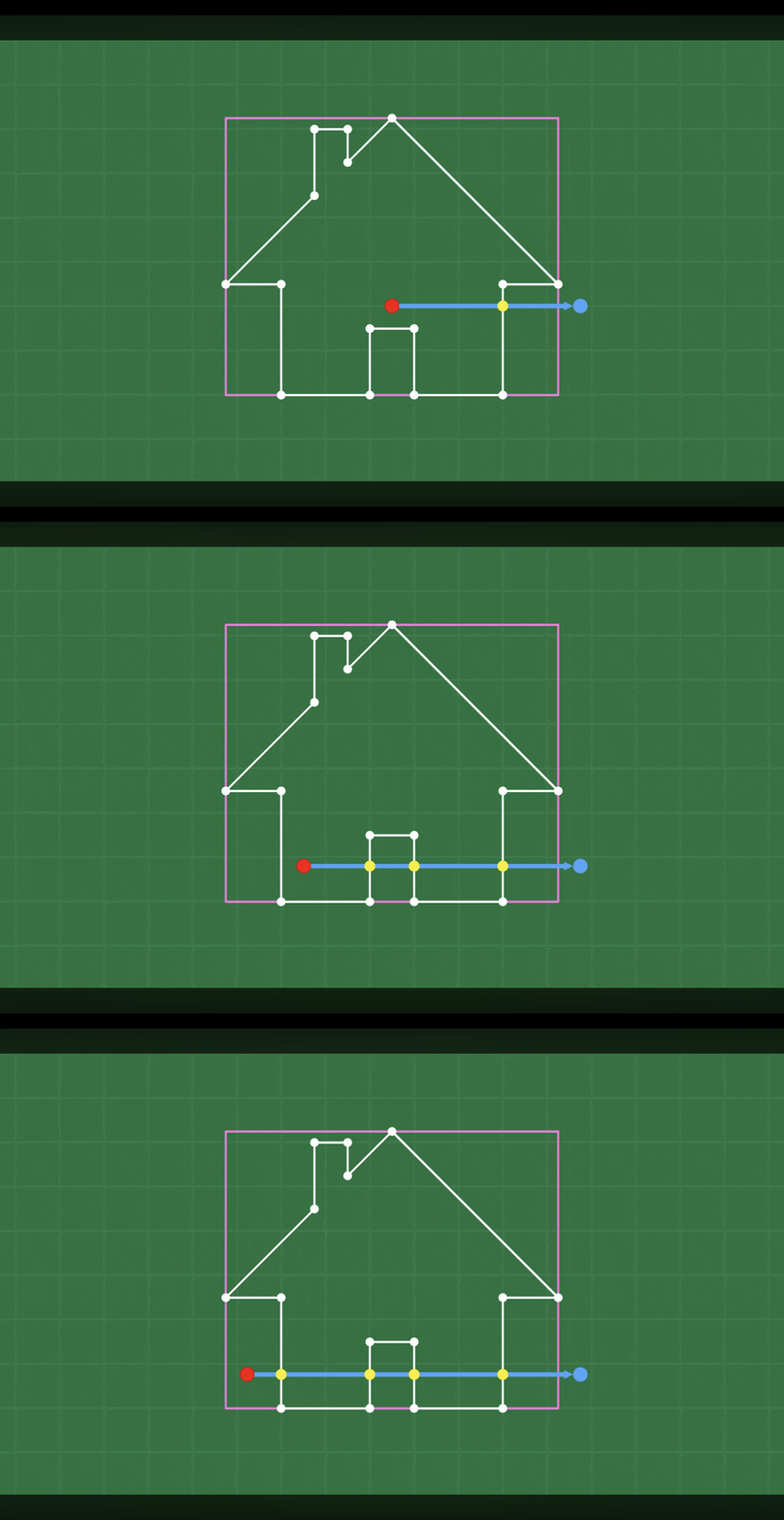 Images taken from Tim FitzRandolph’s video
Then came the real hard part: handling the collisions. The video divides this task into two parts: 1. moving the points such that the shapes no longer overlap, and 2. resolving the velocities of each relevant point. After going back and forth a lot trying to figure out the best way to do this (see fail 1, fail 2, fail 3, and fail 4 in Desmos), I finally figured out a way to move the colliding point out of the shape and adjust the line points according to their masses, which can be viewed on Desmos here.
My basic idea for this, not grounded in physics at all, was to assign a “weight” to each endpoint of the side, which would determine how much it should move based on its mass. If a point has a larger mass, it has a lower weight, corresponding to less movement. This weight was in turn determined by a “projection factor,” a number between 0 and 1 that indicated how close to one side endpoint the colliding point had entered into the shape. This way I could move the side endpoints based on their weights, then just snap the colliding point along that line at the appropriate distance from each endpoint.
By the time I figured out the position resolutions for the points, I was getting kind of burned out of the project, and wanted a simple way to resolve velocities. The video recommends treating the shape side line as a sphere that the colliding point collides with, but the physics for it was kind of over my head at the time, so I decided to simply reflect the colliding point’s velocity along the line perpendicular to the line it was colliding with, which worked well enough at the time.
Adding springs
At this point I was just really eager to get some actual results and simulations, which meant adding strings for the points to be tied together by. Thankfully, this ended up being pretty simple, as I just had to apply Hooke’s law in the direction of the spring, the math for which can be viewed here on Desmos. I had already built in forces for each point, so it was simple to apply these spring forces to each point every frame. After this change, I finally got an object:
I then implemented damping for each spring as described in lisyarus’s blog so it doesn’t bounce around forever, and it actually started looking pretty good!
Conclusion
At this point I was just relieved that I had finally got something that resembled a physics engine. I was a able to get a couple good-looking screen recordings of some jello squares, but it was by no means completely functional:
I was satisfied for the moment, though, and moved on to other projects for a while. Right now, though (December) I’ve come back to it with renewed enthusiasm and hope to 1. prevent shapes from just disappearing and sticking together and 2. make it more physically accurate, as I’ve just finished Physics 1 and can now apply these concepts more successfully.